For YouTube, TikTok & Instagram creators

Your next 400 million viewers don’t speak English.

Add Chinese subtitles, a cover, and a bilingual caption to the YouTube, TikTok, and Instagram videos you’ve already made — ready for RedNote (小红书) in about five minutes. No Chinese needed.

Free preview · No credit card

Chinese-first cover generated by Create In Chinese from an existing creator videoReady for 小红书
Example subtitle

English: “I quit my job to build a startup”

Chinese: 裸辞创业,开启人生新篇章

Why publish on RedNote now

monthly users on RedNote / Xiaohongshu (小红书)
400M+
Chinese platforms from one upload
4
from upload to a publish-ready package
~5 min
words of Chinese you need to know
0

Post to RedNote first, then reuse the same package on WeChat Channels (微信视频号), Douyin (抖音), and Bilibili (哔哩哔哩). The videos you already made are the inventory — YouTube, TikTok, Reels, and Shorts exports all work.

RedNote user figure: Reuters, June 2026

What you get

One upload becomes a complete post

Not a subtitle file you still have to deal with — the whole post. One pass produces the three assets below, and every piece stays editable before you export.

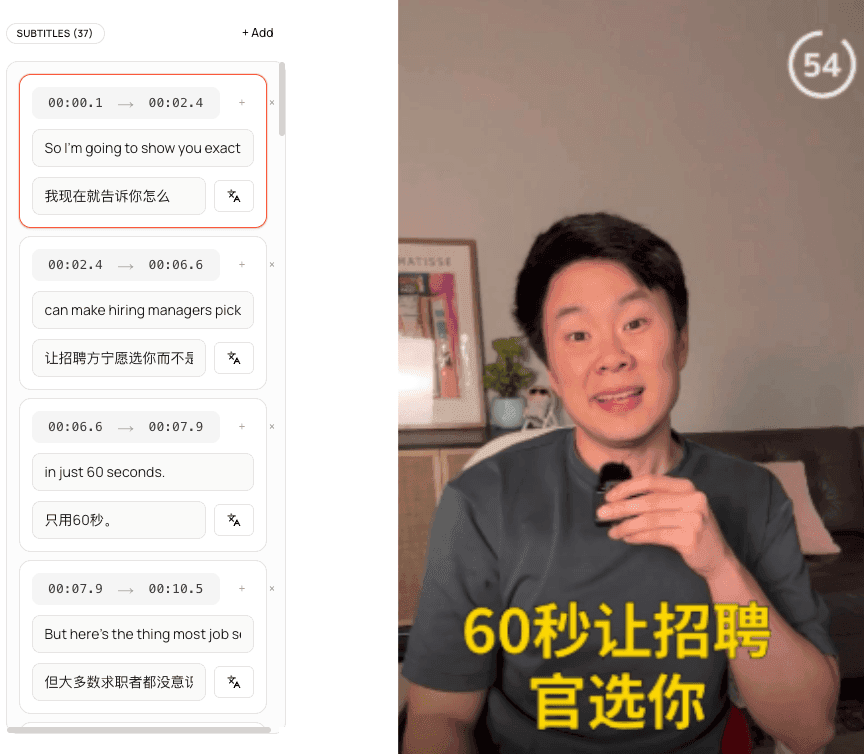
Bilingual Chinese and English subtitles in the Create In Chinese editor

01 · Subtitled video

The full video, subtitled in Chinese — with English beside every line.

Subtitles are burned into the video itself, not handed back as a file. In the editor, the English source sits next to each Chinese line, so you can check meaning without reading a single character.
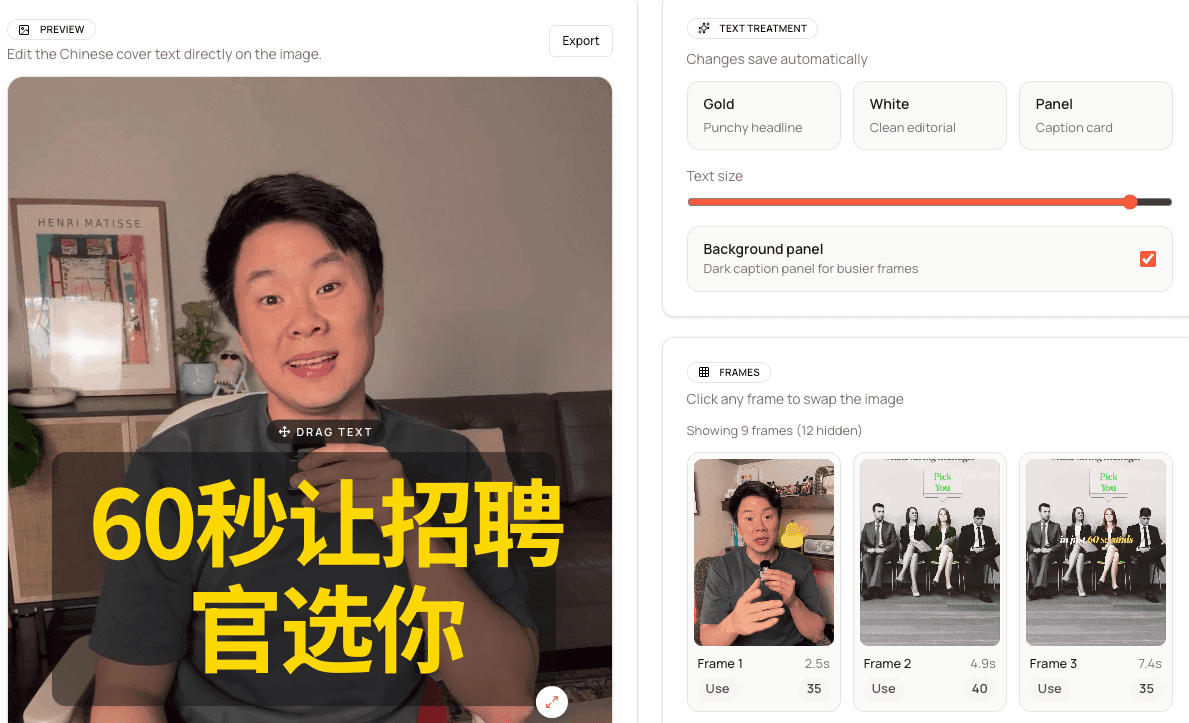
Cover editor showing Chinese headline treatment on a selected frame

02 · Cover

A Chinese cover, built from your best frame.

Pick the frame, adjust the headline, and match the look RedNote feeds reward. The cover is what earns the tap, so it comes with every video instead of as an afterthought.

03 · Caption

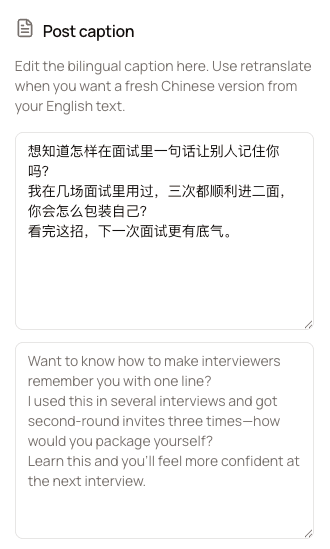
Chinese and English captions, ready to paste.

The caption is written for the same video, so posting is copy-and-paste instead of writing from scratch in a language you don’t speak.

Bilingual Chinese and English caption preview generated by Create In Chinese

No Chinese needed

Post in a language you don’t read — without guessing.

The real fear isn’t the work — it’s publishing something you can’t check. Everything is built so you can verify every line before it goes out.

  • English beside every line

    Subtitles, cover text, and captions keep the English source next to the Chinese, so you can verify meaning line by line without reading characters.

  • Translated, then checked

    Every line is translated, then checked automatically. Lines that come back untranslated, garbled, or missing a name get a second AI pass before you see them.

  • You publish, not us

    Nothing auto-posts and Create In Chinese never touches your accounts. Review every asset, edit any line, and export only when it looks right.

How it works

Three steps. About five minutes.

Subtitle timing, cover, and caption stay in one project, so you review everything in one place instead of stitching together three tools.

  1. Step 1

    Upload a video you already made

    English is the supported source language. MP4, MOV, WebM, M4V up to 200MB on free.

  2. Step 2

    Generate the full package

    Create In Chinese translates and subtitles the full video, then prepares the cover treatment and bilingual caption in the same pass.

  3. Step 3

    Review, export, post

    Open the project, review the fully subtitled video, tighten the cover and caption, and export a package that is ready to post on RedNote.

Why this exists

“I already knew the content worked on TikTok and Instagram. The frustrating part was getting that same video ready for Chinese audiences without rebuilding everything in separate tools. Create In Chinese puts it all in one place: one upload, one review, and a post you can actually publish.”

Preston Chin, co-founder of Create In Chinese

Preston Chin

Co-Founder, Create In Chinese — posting on RedNote himself

Read the full story

Pricing

Preview free. Upgrade when it’s working.

Free lets you see one of your own videos with Chinese subtitles before you pay. Pro is for downloading and publishing on a schedule.

Free

$0no credit card

  • 1 preview video on your own content
  • Upload up to 200MB
  • Watch and edit the subtitles, cover, and caption in the app
  • Downloads come with Pro
Preview free

Pro

$9/month

  • 30 videos per billing month
  • Uploads up to 2GB each
  • Ongoing full-package and direct video downloads
  • Cancel anytime
See full pricing

FAQ

Frequently asked questions

Something else on your mind? Ask us directly.

Do I need to know Chinese?

No — and you never have to guess. The English source stays next to every Chinese line in the subtitles, cover, and caption, every line is checked automatically after translation, and nothing publishes until you export it yourself.

Why RedNote / Xiaohongshu?

RedNote (Xiaohongshu) has over 400 million monthly active users, according to Reuters, but it is still early for English-speaking creators. Content you have already proven on YouTube, TikTok, or Reels can land there with far less competition than it faces at home.

What is Create In Chinese?

Create In Chinese is a web app that turns one English-language video into a Chinese-ready publish package: the full video with Chinese subtitles burned in, a Chinese cover image, and a bilingual Chinese and English caption, ready to post on RedNote / Xiaohongshu, WeChat Channels, Douyin, and Bilibili.

How long does it take?

Most videos finish in about 3 to 5 minutes. You get one complete package instead of orchestrating multiple tools.

Can I post on RedNote if I don't live in China?

Yes. You can create a RedNote account with an international phone number and post from anywhere. Our guide on posting to Xiaohongshu in English walks through account setup and what the feed rewards.

What languages are supported today?

Today it’s English-language videos in, Simplified Chinese subtitles, cover text, and captions out. More source languages are planned.

What video formats work?

MP4, MOV, WebM, M4V. Up to 200MB on free and 2GB on Pro. There is no duration limit.

Can I edit the subtitles, cover, and caption?

Yes. The project stays editable after processing so you can refine subtitle timing, update the cover text, and adjust the bilingual caption before export.

When should I upgrade to Pro?

Start with the free preview to see one of your own videos with Chinese subtitles in the app. Upgrade when you want to download it: Pro includes every download (subtitled video, cover, captions, and full package) and 30 videos a month.

Your best videos already exist. Post them in Chinese this week.

Upload one video and review the full package — Chinese subtitles, a Chinese cover, and bilingual captions — in about five minutes. Then post it to an audience your competitors haven’t reached yet.

Try free on a real video

Free preview · No credit card · Nothing posts without your review